
Home · How it works
Real-time Microsoft Teams wallboards, agent presence and call analytics — in one product
Teams Wallboard is single-purpose software that puts your Microsoft Teams call queues, agent status and service level on any screen — laptop, TV, Yodeck, ScreenCloud. €10/month for the whole organization, unlimited agents, wallboards and TV displays. 14-day free trial via a single OAuth login to your Microsoft 365 tenant.
What Teams Wallboard does
Live call statistics
Calls in queue, wait times, answer rates and service levels pulled directly from Microsoft Graph — refreshed every 30 seconds.
Agent presence dashboard
See who is available, busy, in a call or away. Filter by team, queue or location. Perfect for team leads and floor managers.
Drag-and-drop wallboards
Build multiple wallboards per organization. Drag widgets, resize them, lock the layout once you're happy.
Public wallboards on TV
Share via a public link for lobby screens, Yodeck or ScreenCloud. PIN protection and IP whitelisting per wallboard.
Call analytics + CSV export
Deep-dive into call history. Filter by queue, agent, direction and period. Export to CSV for management reporting.
Enterprise security
IP whitelisting per wallboard, PIN codes on public links, OAuth-only login. SOC 2 hosted on Supabase EU region.
Multi-wallboard support
Unlimited wallboards in one organization. Separate wallboards for call center, helpdesk, sales and lobby — one license.
Auto-sync Microsoft Graph
Call records sync automatically from Microsoft Graph API. Presence refreshes in real time via Supabase live subscriptions.
What it looks like
Three different perspectives on the same data: real-time wallboard, call analytics dashboard and agent overview.
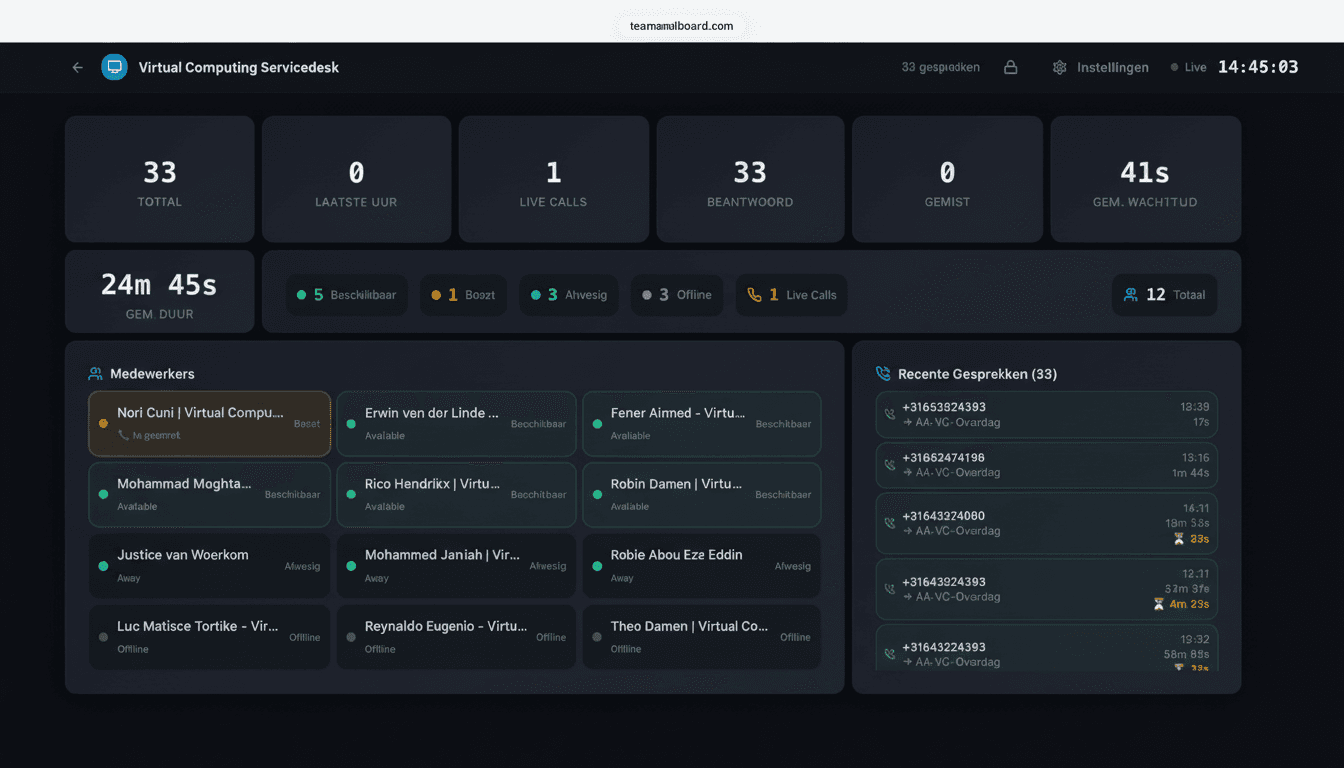
Real-time wallboard
The TV view. Calls in queue, wait time, service level, agent status — all drag-and-drop and built for 24/7 displays on Yodeck or ScreenCloud.
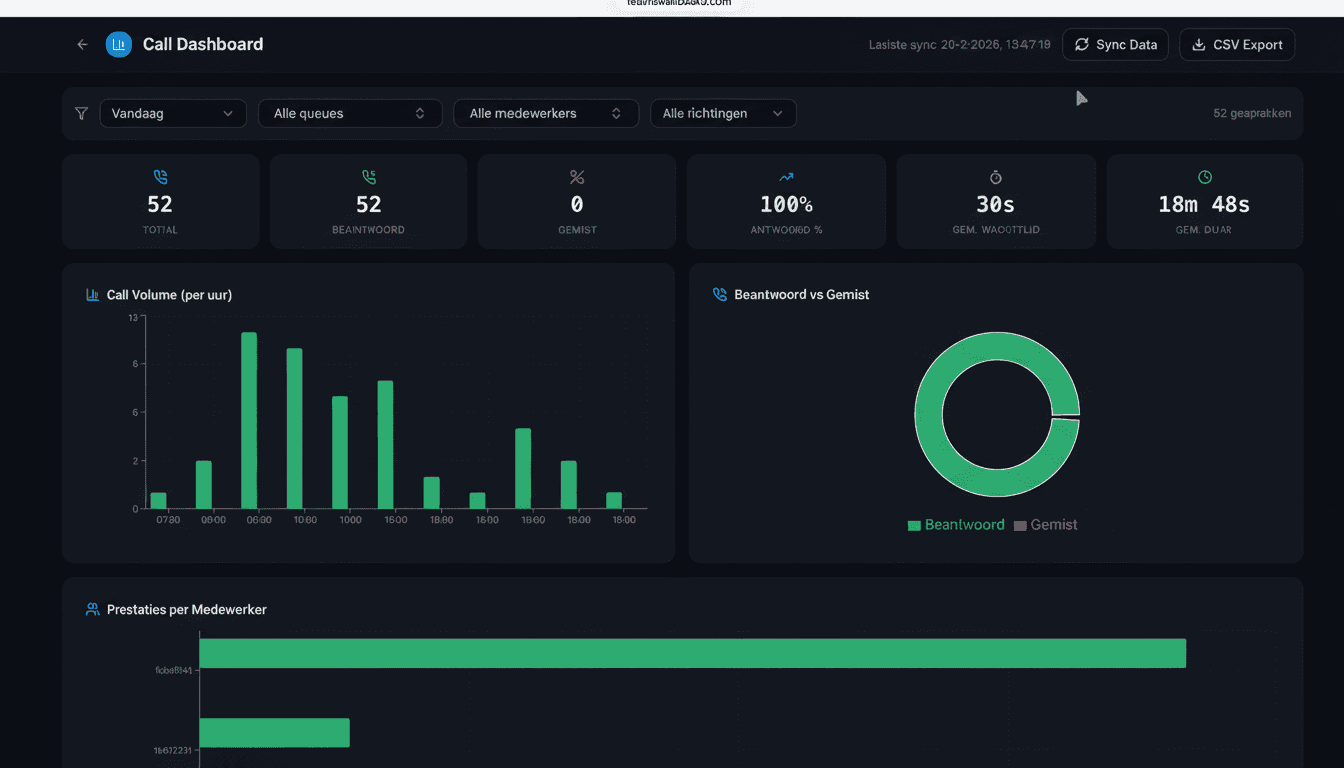
Call analytics dashboard
Deeper analysis behind the live wallboard. Filter by queue, agent, direction and period. Export to CSV for management reporting or Power BI.
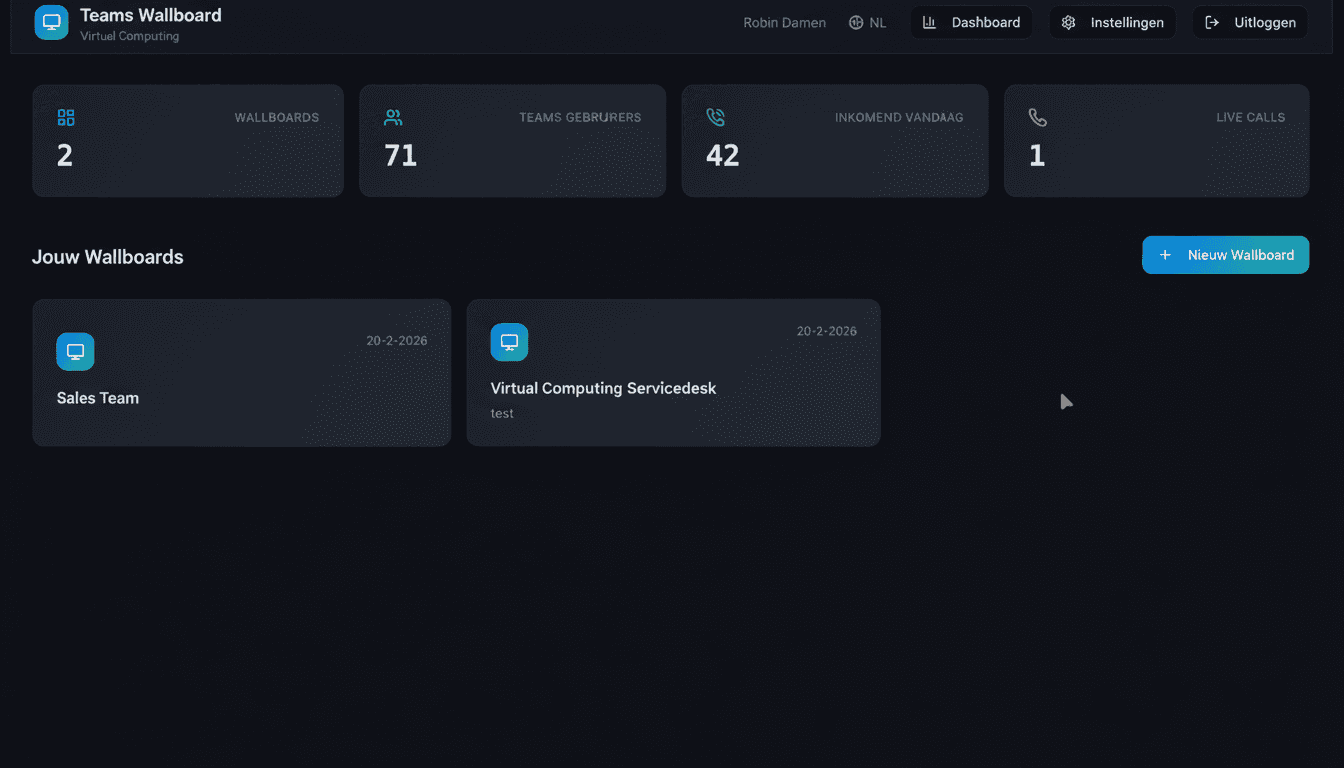
Dashboard overview
Central hub for admins: wallboard count, linked Teams users, inbound calls today, live calls. Create and manage multiple wallboards for different departments.
12 widgets to pick from
Drag widgets onto your wallboard, resize them and lock the layout. Mix and match per use case.
- Calls in queue (live counter)
- Wait time current + average
- Service level percentage (target vs achieved)
- Abandonment rate with trend chart
- Agent presence (available/busy/in call/away)
- Calls answered today / week / month
- Average call duration per agent
- Inbound vs outbound calls
- Call volume trend (per hour, per day)
- Top performers leaderboard
- Recent calls feed
- Wait time histogram
Who is it for?
Call center operations
Floor managers see live SLA, calls in queue and agent status on a central screen. When queue volume spikes, the SLA meter turns red and someone steps in.
IT helpdesk
First, second and third-line helpdesk wallboards on a single Yodeck display rotating between them. Helpdesk staff coordinate better during peak hours.
Sales team productivity
Outbound calls per agent, average call duration and target tracking on a sales floor TV. Gamification without an enterprise CRM license.
Reception / lobby display
PIN-protected public wallboard with general opening hours and occupancy info. Visitors see a professional operation without competition-sensitive data.
Multi-location monitoring
Three offices, three separate wallboards filtered on location-specific call queues. One Teams tenant, one license, each office its own screen.
Remote helpdesk monitoring
Manager at home with agent presence wallboard on a second screen. Live view of who's logged in and who's on a call — even with distributed teams.
Works with
Microsoft Graph API
Native integration via OAuth — reads presence and call records. No access to messages, files or mailbox.
Microsoft Teams Phone
Works with Calling Plans, Operator Connect and Direct Routing — all Teams Phone configurations.
Public wallboards run natively on Yodeck players via the web page widget. PIN + IP whitelisting for enterprise security.
Native via ScreenCloud's Link app. Works on all ScreenCloud licenses including Free trial.
Browser-based TV
Apple TV, Smart TV with browser, NUC, Raspberry Pi with Chromium — the wallboard is just a webpage.
Pricing
One price
Per organization. Unlimited agents, wallboards and TV displays.
- 14-day free trial
- No credit card required to start
- Cancel monthly — no contract
- iDEAL or SEPA direct debit
- All features, no tier system
- Email support within 24 hours
Security & privacy
Microsoft Graph read-only scopes
We only request Presence.Read.All and CallRecords.Read.All. No access to messages, files, mailbox or OneDrive.
EU hosting via Supabase
Database and authentication run on Supabase EU region (Frankfurt). GDPR compliant.
PIN + IP whitelisting per wallboard
Protect public wallboards with a 6-digit PIN, per-wallboard IP whitelist, or both. URL tokens are 16 random characters (not brute-forceable).
Microsoft 365 OAuth
Login only via Microsoft 365 OAuth. No separate passwords, no local account database.
Frequently asked questions
Which Microsoft 365 license do I need?
Microsoft 365 Business Standard or higher with Teams. For call records you need a Teams Phone license on the users you want to monitor (Phone Standard or Microsoft Calling Plan).
How many agents can I monitor on one license?
Unlimited. €10/month is for the whole organization — no per-agent pricing. Whether you have 5 or 500 agents, it's the same license.
How many wallboards can I create?
Unlimited. Build separate wallboards for call center, helpdesk, sales and reception — all within one license.
What does Teams Wallboard not do?
Call routing or IVR (use native Teams Auto Attendant), workforce management (forecasting, scheduling), and quality monitoring or call recording. For those heavier features we point to Anywhere365 or Calabrio — we do one thing well: wallboards and call analytics.
What if I want to cancel?
Cancel monthly in Settings. No contract, no annual commitment. Your data is kept for 30 days in case you come back.
Try Teams Wallboard free for 14 days
Connect your Microsoft 365 tenant in 5 minutes via OAuth. No credit card, no contract, cancel monthly.
Start 14-day free trial