
Home · Call center software
Call center software for Microsoft Teams
You don't need a separate, expensive call center platform to run your phone team. Teams Wallboard is lightweight call center software that runs on top of the Microsoft Teams setup you already have — adding real-time wallboards, agent presence and call analytics. One OAuth login, no migration, €10 per month for your entire organization.
On top of Teams, no migration
Connects to your Microsoft 365 tenant with a single OAuth login. You keep your existing Teams numbers, queues and routing.
Wallboards & analytics
Real-time wallboards, service level, agent presence and call analytics with CSV export — all drag-and-drop.
One flat price
€10 per month per organization, unlimited wallboards and users. No per-seat licenses, no implementation fees.
Call center software without a new platform
Most call center software asks you to move your telephony to a brand-new platform — new numbers, an implementation project and a license for every agent. If you already run Microsoft Teams Phone with call queues, you own the calling infrastructure. Teams Wallboard only adds the layer Teams doesn't ship out of the box: live visibility and reporting.
The result is call center functionality — queue monitoring, service level, abandonment, agent presence and wallboards on TV — at the price of a tool, not a platform.
What call center software actually needs to do
Strip away the marketing and call center software has five core jobs. Not every organization needs all five, but this is the checklist to judge any product against:
- Route calls — send callers through a menu (IVR) to the right queue and distribute them across available agents.
- Monitor in real time — see live how many calls are waiting, for how long, and whether your service level is under pressure.
- Make it visible on the floor — the same numbers on a TV or wall screen, so the whole team sees when things get busy.
- Track staffing — which agents are available, busy or away, and does that match the current workload?
- Report — historical data per queue, agent and period, exportable for management and shift planning.
Here's the crux: if you run Microsoft Teams Phone with call queues, Teams already does job one very well. Auto Attendant handles your menu, call queues distribute the calls and your numbers live in your own tenant. What Teams doesn't provide out of the box are jobs two through five in a form that works on the floor: there is no wallboard for a TV, no freely composed KPI dashboard across multiple queues and no CSV export of your call analytics. That is exactly the layer Teams Wallboard adds — for €10 per month, without touching your routing.
What's included
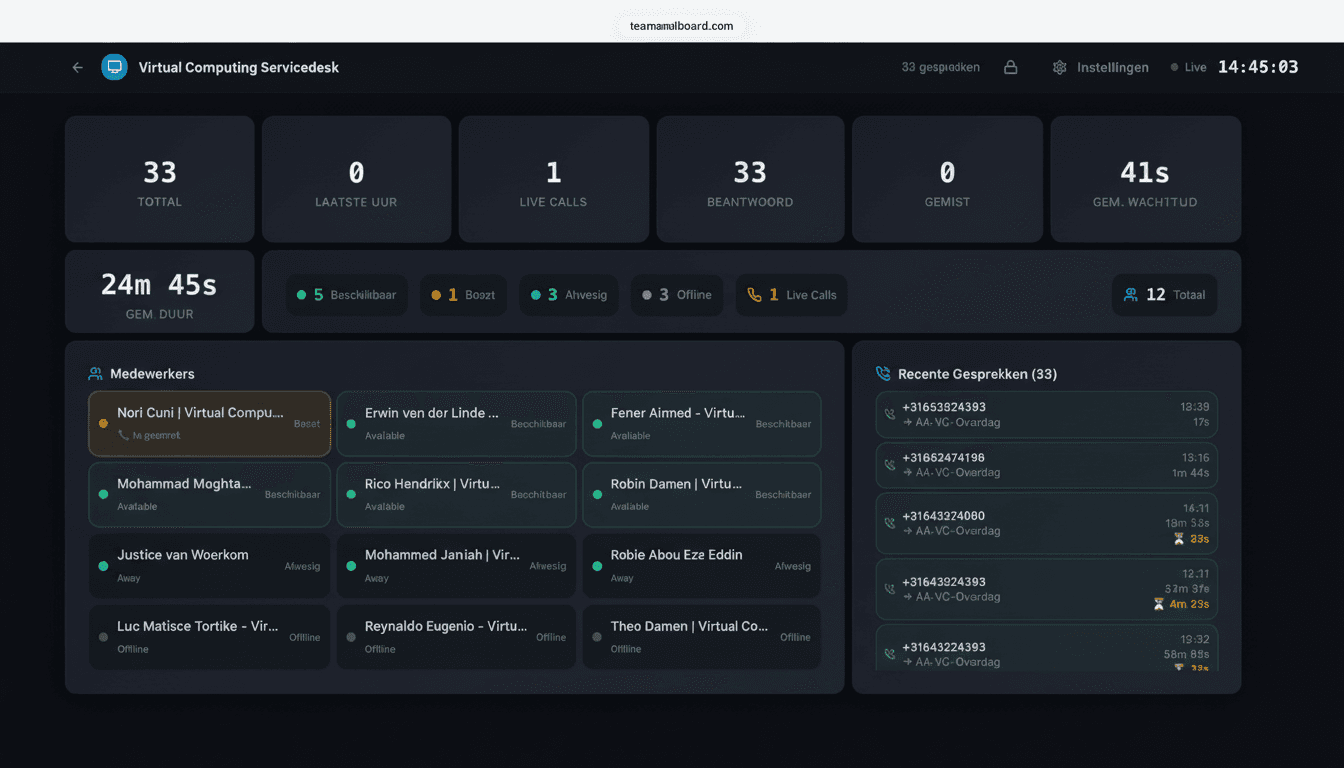
- Real-time wallboards — drag-and-drop KPI screens for the department or a TV.
- Agent presence — live availability straight from Microsoft Teams.
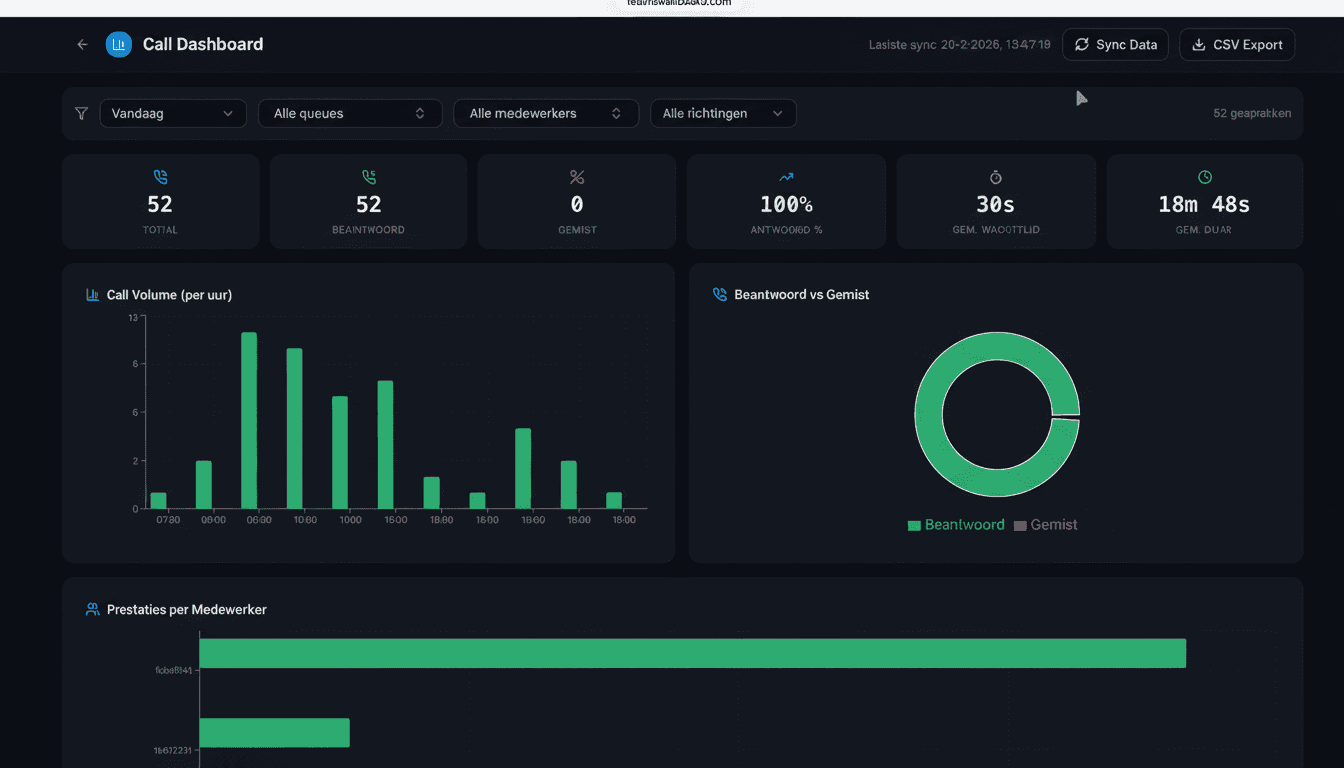
- Call analytics — call history with filters by queue, agent and period, plus CSV export.
- Service level & SLA — measure whether you hit your targets, per queue.
- Public wallboards — safely on TV via Yodeck or ScreenCloud, with PIN and IP whitelisting.
When native Teams is enough — and when it isn't
To be fair: Microsoft has invested heavily in call center functionality inside Teams over the past few years. The Queues app gives agents and team leads basic real-time metrics inside the Teams client itself, and with Teams Premium licenses supervisors get features like monitor, whisper and barge. For a small team that works entirely inside the Teams client and doesn't need a screen on the wall, that can be perfectly sufficient.
The line is visibility and reporting. The Queues app lives inside the Teams client of individual, licensed users: there are no TV wallboards, no publicly shareable links, no drag-and-drop layouts, no custom KPI dashboards across multiple queues and no CSV export of your analytics. If you want the whole department — or a second office — to see at a glance how the day is going, you need a layer on top.
| Feature | Microsoft Teams native (Queues app) | Teams Wallboard |
|---|---|---|
| Real-time queue metrics | Inside the Teams client, for licensed agents | In the browser, refreshed every 30 seconds |
| Wallboards on TV screens | Not available | Public link, Yodeck, ScreenCloud or any browser |
| Public shareable links with PIN & IP whitelisting | Not available | Configurable per wallboard |
| Drag-and-drop custom layouts | Fixed views | Unlimited wallboards, laid out your way |
| Custom KPI dashboards across queues | Per-queue views | Combine queues and KPIs on one screen |
| CSV export of call analytics | Not available | Filter by queue, agent and period |
| Monitor, whisper & barge | With Teams Premium licenses | Deliberately not — monitoring only |
| Call routing & IVR | Auto Attendant and call queues | Uses your existing Teams routing |
| Licensing model | Teams Premium per user for supervisor features | €10 per month per organization, unlimited users |
The two are not mutually exclusive: many teams use the Queues app for agents and supervisors inside the client, and Teams Wallboard for the screens on the wall and the monthly reporting.
The TCO math: €10 per organization vs per-agent pricing
Traditional call center suites charge per agent per month, usually with an annual contract and an implementation project on top. Say a suite costs €30 per agent per month: with fifteen agents you pay €450 per month, over €5,000 per year — before a single implementation hour. When your team grows, your bill grows with it.
Teams Wallboard works differently: €10 per month for your whole organization, with unlimited agents, wallboards and queues. Whether you monitor 5 or 500 people, the price stays the same. There is no implementation project — the OAuth connection takes less than two minutes and your first wallboard is live within 5 minutes. No annual contract, cancel monthly, and the first 14 days are free with no credit card required.
Two honest caveats. One: you need Microsoft Teams Phone licenses on the users you want to monitor — which you already have if Teams is your phone system. Two: if you want supervisor features like monitoring calls, that is the native Queues app with Teams Premium, a paid per-user add-on license that is separate from Teams Wallboard.
Who is this call center software for?
IT helpdesk
First and second-line support with the queue live on a wall-mounted screen. During peak hours everyone sees instantly when it is time to jump in.
Customer service
Track service level and abandonment per queue. Team leads intervene before callers hang up, instead of reading about it in a report afterwards.
Sales teams
Outbound calls, talk time and a leaderboard on the sales floor. Healthy competition without expensive CRM add-ons.
Reception & multi-site
A PIN-protected wallboard per location, filtered to its own queues. One Teams tenant, one €10 license, every office its own screen.
Built in the Netherlands: developed and supported by RDM Media BV in Oisterwijk, with billing via credit card, iDEAL or SEPA direct debit. Data is hosted in the EU.
Frequently asked questions about call center software
What is call center software?
Call center software helps a phone team manage inbound and outbound calls, distribute them across a queue and measure how well the team performs. Teams Wallboard is lightweight call center software that runs on top of your existing Microsoft Teams: it adds real-time wallboards, agent presence and call analytics without forcing you onto a new telephony platform.
Do I need a separate call center platform next to Microsoft Teams?
No. If you use Microsoft Teams Phone with call queues, you already own the calling infrastructure. Teams Wallboard simply adds the monitoring and reporting layer on top via the Microsoft Graph API — you keep your existing numbers, queues and routing.
Does it work with Teams Phone via Direct Routing?
Yes. All Microsoft Teams call records — Calling Plans, Operator Connect and Direct Routing — arrive via Microsoft Graph and show up in your wallboards and analytics.
How much does call center software for Microsoft Teams cost?
Teams Wallboard costs €10 per month per organization, with unlimited wallboards, users and queues. You start with a 14-day free trial without a credit card and can cancel monthly — far cheaper than a full standalone call center platform.
Is it suitable for small and mid-sized teams?
Yes. It is built for helpdesks and customer service teams that already work in Microsoft Teams: enterprise features like service level monitoring and TV wallboards at a low flat monthly price, with no implementation project. Setup is a single OAuth login that takes less than two minutes.
What does this call center software deliberately not do?
Teams Wallboard does no call routing or IVR (Teams handles that with Auto Attendant and call queues), no workforce management and no call recording. If you need supervisor features such as monitor or whisper, the native Queues app with Teams Premium covers that — Teams Wallboard focuses on wallboards, presence and analytics.
Try the call center software free for 14 days
Connect Microsoft Teams and see your first live wallboard within 5 minutes. No credit card required.
No credit card required · €10/month after the trial · cancel monthly
Prefer a guided tour first? Book a demo — useful for larger organizations with multiple locations.