
Home · Integrations · Yodeck
Microsoft Teams wallboard on Yodeck — live call queue monitoring on TV
Teams Wallboard runs natively on any Yodeck display. Create one public wallboard link, paste it into a Yodeck "Web page" widget and your call center, helpdesk or lobby screen shows your Microsoft Teams call queue, agent presence and service level — live. No agent on the player, no broker server, no extra license — just Chromium pointed at our server-rendered PWA.
PWA native
Works on every Yodeck player generation — Chromium plays the wallboard.
PIN + IP whitelisting
Protect public links with a 6-digit PIN and/or a list of allowed IP addresses.
Real-time data
Calls in queue, agent status and SLA refresh automatically every 30 seconds.
Set up in 5 minutes
The Yodeck integration is deliberately simple: Teams Wallboard creates a URL, Yodeck plays it. No API coupling between the platforms is needed — what Yodeck engineers call "URL-driven content".
- 1
Build your wallboard in Teams Wallboard
Log in at teamswallboard.com, connect your Microsoft 365 tenant via OAuth, pick the call queues and users you want to show, and drag widgets (calls in queue, agent presence, SLA meter, trend chart) onto the board.
- 2
Enable the public link with a PIN
Click Settings → Public sharing → toggle "Make public". Optional: set a PIN code (only your Yodeck player knows it) and add your office or player IP address to the IP whitelist.
- 3
Paste the URL into Yodeck
Log in to the Yodeck dashboard → New Media → Web Page → paste
https://www.teamswallboard.com/public/[your-token]→ Save. Set scroll and zoom to "Fit to screen" for full-HD displays. - 4
Add the widget to a playlist
Create a playlist with your new wallboard widget. For a single wallboard, set the duration to "Forever". For multiple wallboards (say call center + helpdesk + lobby), set 30-60 seconds per widget and Yodeck rotates automatically.
- 5
Push it to your Yodeck player
Assign the playlist to your player. Within 30 seconds your Teams call queue is live on the TV screen. The wallboard refreshes itself — Yodeck does not have to do a thing.
Why Yodeck + Teams Wallboard works
Yodeck is digital signage software driving dedicated TV players — built to run 24/7 without intervention. Teams Wallboard is SaaS that visualizes Microsoft Teams call data. The combination fills exactly the gap in Microsoft's own offering: the Microsoft Teams admin center cannot push live wallboards to TV screens, and Power BI dashboards do not refresh fast enough for live operations.
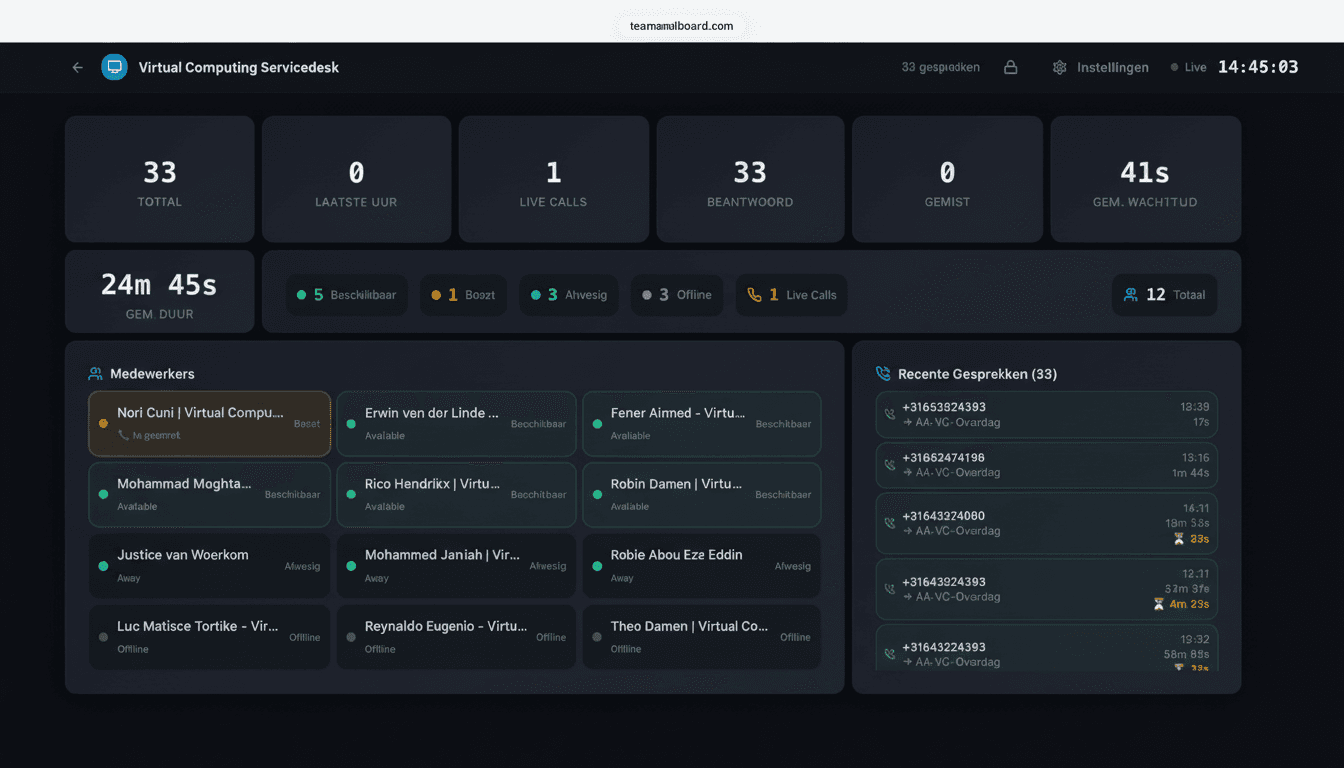
What you actually see on your Yodeck screen:
- Number of calls in queue per Teams call queue
- Average wait time today vs. yesterday
- Service level percentage (target vs. achieved)
- Abandonment rate with a trend chart
- Agent presence: available / busy / in a call / away — with names
- Calls handled today, this week, this month
- Average call duration per agent
- Live trend charts (calls per hour, peak hours)
Common Yodeck scenarios
Call center operations floor
One big 65" screen above the desks continuously shows the SLA meter, calls in queue and agent status. Yodeck player on the wall, screen always on. Floor managers see at a glance whether things are escalating. When queue volume spikes, the SLA meter turns red and the team lead knows immediately that someone needs to jump in.
Multi-team IT helpdesk
Three wallboards — first line, second line, change management — rotating every 45 seconds on one Yodeck display next to the helpdesk counter. The rotation shows helpdesk staff how the neighboring teams are doing, which speeds up coordination during peak hours.
Reception / lobby display
A visitor-friendly wallboard without sensitive numbers: just team count, opening hours and a live staffing chart. PIN-protected so only the Yodeck player at reception has access. It gives customers a professional view of your operation without leaking competitively sensitive information.
Remote helpdesk (work-from-home agents)
A Yodeck player at the manager's home office showing the agent presence wallboard. The manager sees live who is logged in and who is on a call, even with the team spread across the country. It replaces the physical "who's sitting where" glance of a traditional call center.
What it costs
Teams Wallboard costs €10/month per organization — regardless of how many Yodeck displays, agents or wallboards you run. 14-day free trial, cancel monthly.
Yodeck pricing is separate: from $7-15 per player per month depending on the license. Yodeck players cost $99-299 one-off (Yodeck's Pi-based player, or flash your own Raspberry Pi 4).
Total for a single-screen call center setup: roughly €20-40 per month all-in — about what a traditional contact center license costs per year, but paid monthly for the whole stack including the signage license.
Frequently asked questions
Does Teams Wallboard run directly on a Yodeck player?
Yes. Yodeck players run Chromium and can load any modern web page. Create a public wallboard link in Teams Wallboard, paste it into a Yodeck 'Web page' widget and your wallboard is live on the TV. No extra software or agent needed on the Yodeck player.
Is a public wallboard link safe on a Yodeck screen?
Yes. Every public wallboard can optionally require a 6-digit PIN, and you can set IP whitelisting per wallboard so only your office or Yodeck IP gets access. The link contains a random 16-character token that cannot realistically be brute-forced.
What is the minimum Yodeck license I need?
All Yodeck tiers — including Yodeck Free — support web-page widgets, so any license works. For stable 24/7 operation we recommend Yodeck Standard or higher because of automatic updates and remote management.
How often does the wallboard refresh on a Yodeck screen?
The wallboard refreshes itself every 30 seconds inside Chromium — Yodeck does not have to do anything. Live calls in queue appear almost instantly through real-time Supabase subscriptions; statistics such as service level refresh every minute.
Can I show multiple Teams wallboards on one Yodeck player?
Yes. Create a Yodeck playlist with multiple web widgets, one per wallboard, and set a duration per widget (30 seconds, for example). Yodeck automatically rotates between your call center wallboard, helpdesk wallboard and service level dashboard.
Put your Microsoft Teams data on your Yodeck screen
14-day free trial. Connect your Teams tenant in 5 minutes and see your first live wallboard within 30 seconds.
No credit card required · €10/month after trial · cancel monthly
Rolling this out across multiple locations? Book a demo →